QualityOne Commercial Cleaning

  • Home
  • Contact Us
  • Services
  • About
  • Media
  • Careers
  • Blog

June 17, 2013 By Admin

Best of Story County 2013

QualityOne Commercial Cleaning, Inc. has been voted Best of Story County for the third year in a row!

We give a big thank you to the people of Story County and all our satisfied clients for making us #1.  We appreciate all your support!  We are continually grateful to be able to serve Story County and the surrounding areas.  We also thank all of our wonderful employees, who dedicate themselves to being the best everyday.  We could not have received this honor without you.

                                                                                                         ~ Q1 Management

Best of Story County Results

Click here to see the Best of Story County 2013 results

(See page 12 for QualityOne Commercial Cleaning, Inc.)

 

Filed Under: Blog

April 4, 2013 By Admin

How To Clean Your Computer Keyboard

Computer Keyboard 2General Cleaning

  • First, check your manual for any specific instructions pertaining to your keyboard.

  • Disconnect your keyboard from the computer.

  • Hold your keyboard upside down and gently shake any loose debris out of the keys.

  • Put the keyboard down and use a can of compressed air to clean between the keys.  You can purchase compressed air at your local home-improvement or office supply store.

  • Use a cotton swab with either a special electronics cleaner, such as Endust for Electronics, or use isopropyl alcohol.  Apply the cleaner to the swab and swipe it along the outside edges of the keys and between the keys.

  • You can also use a soft cloth to wipe down the surface of the keyboard and wipe any grime or fingerprints off the tops of the keys and surrounding areas.  Be careful not to rub off the lettering.

  • Wait a few minutes to be sure the keyboard is completely dry before plugging it back into the computer.


Spills on Keyboards

Spilling liquid on your keyboard can hurt it in two ways.  First, if you spill something other than water, your keys can become sticky and will not function properly.  Second, it can cause an electrical short-out in the circuit board.  If you spill something on your keyboard you may need to do a more thorough cleaning:

  • Immediately turn the keyboard upside down and let it drain for several hours.

  • Gently pry off the small keys with a flat end/standard screwdriver.  You may want to avoid taking off the larger keycaps, such as the spacebar, Shift, and Enter, as these can be difficult to re-attach.  Take a photo or draw a diagram of the keyboard before you remove the keys to make sure you get them back into the same places.

  • Clean the keys individually.  You may want to soak them in isopropyl alcohol for a short time.  Again, be careful not to clean away the letter markings.

  • To clean the inside of the keyboard you’ll need a small screwdriver to remove the screws in the back of the keyboard.

  • To wipe the circuit board down, use a soft cloth and isopropyl alcohol.  A pasty substance on the metal indicates damage.  Use a small brush dipped in alcohol to scrub the paste away.  Never use water on a circuit board.

  • Let all components dry thoroughly for a least a day before re-assembling and plugging back into the computer.


If you follow these steps and your keyboard will still not function properly it may have been too damaged.  You will need to take it to a computer repair service for further analysis or purchase a new keyboard.

Ideas can vary on how long to let the keyboard dry, various techniques, etc., so here are a few links I’ve found with their own instructions for cleaning a keyboard.  The last link will take you to numerous instructional videos on YouTube that may help as well.

How to Clean Your Keyboard – pcworld.com

How to Dry Out a Keyboard After a Spill – voices.yahoo.com

How to Thoroughly Clean Your Keyboard Without Breaking Anything – howtogeek.com

How to Clean Your Computer Keyboard – YouTube Videos

K. Carter

QualityOne Commercial Cleaning, Inc.

319 Sondrol Ave

Ames, IA 50010

(515) 232-7272


Photo taken from Microsoft Office Free Clipart:

http://office.microsoft.com/en-us/images/


Filed Under: Blog

March 4, 2013 By office

Tips for Cleaning and Organizing Your Workspace

CB0072731.  Size it up.  First, step back and assess the desk.  What do you have on your desk that really needs to be there and what can you move?  How much space do you have?  What needs to get done there?  Knowing what you’re working with and where you need to be is the first step to getting there.


 2.  Clear it off.  Remove any large items and those you just don’t need to have on your desk.  Stick them under the desk if you don’t use them much, or get a small table to set them on to the side.  This can clear up a lot of work space.


3.  Need more space?  If you need more space to put things away you may want to look into getting a simple plastic drawer set, a nice cabinet, or a wooden chest of drawers for your office area.


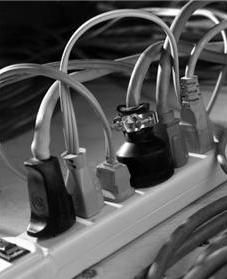
4.  Contain and label cords.  

Power Strip

Cords can be especially troublesome and messy.  Use plastic zip ties or Velcro strips to bind extra cord length and keep it untangled and out of the way.  If you want to keep your cords off the floor, try mounting a wire tray or other container to the back of the desk or underneath the desktop to hold them.* You may also want to tag your cords for quick identification at the power strip.  ID each cord with a wire ring and tag.  You can also purchase tags at your local office supply store or online which are fancier and made specifically for cord identification.  I’ve included some links at the end of this blog to help you out.  Otherwise simply wrap a length of masking tape around each cord, sticking the two sides of the tape together to make a strip for the name of the item.


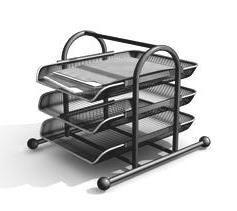
 Desk File 3, B&W

5.  Accessorize.   Use organizational accessories to help you out.  You can find a variety of pencil holders, stackable desk trays, etc. to neatly hold those things you need to have at hand.  Instead of having a messy stack of papers covering you desk, keep them tidy in a desktop file.  Your inbox should contain all those items you need to get done.  Your outbox should contain all those items you have completed that need to be delivered or filed away.  Make sure you empty your outbox frequently.


6.  File it away.

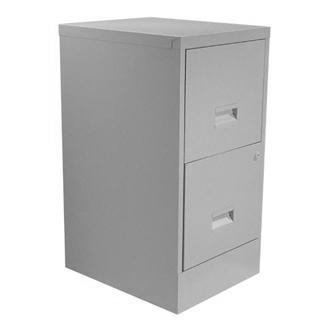
File Cabinet, B&W

If you have a lot of paperwork you’ll need a file.  You can purchase a file cabinet at your local office supply store or find a slightly used one cheaper at your local second-hand store.  Most office supply stores also sell plastic file boxes, if a large metal filing cabinet just doesn’t work for you.  You may also purchase storage boxes that you can put old files in, label, and neatly stack away.

File Box


7.  Organize what’s inside.  Don’t forget to look inside those desk drawers!  Get everything out, weed through what you need to keep and what you need to throw out or keep elsewhere.  You may want to get some small containers or a desk drawer organizer to help you keep the little things sorted and neatly at hand, such as paper clips, rubber bands, ink stamps, push pins, etc.


8.  Too many notes?  Keep a notebook for important notes and reminders, and mark off items as they are taken care of.  This keeps everything neatly together and keeps information from getting lost.  It also keeps your desk from overflowing with sticky notes.  If you have printed documents, fliers, or other paperwork you need to keep out and visible consider getting a bulletin board to post it on.

Notebook 1, B&W


9.  Contain clutter.  Make a place for the little things that you often carry back and forth between the office and home.  This might include a wallet, keys, cell phone, or hand held organizer.  Get a small wire basket or a pretty bowl to hold these items.  You could also purchase a charging/organizational station for some of these.  If you feel you need to keep them more secure make a small space for them in a locking desk drawer or file cabinet.


10.  See the light.  Make sure you have enough light at your desk.  If your office is dim and you don’t have enough space for a desk lamp, consider getting a tall floor lamp to place beside the desk.


11.  Keep it dusted.   Dust builds up quickly.  Keep a cloth or duster close at hand for quick and easy dusting.  Microfiber cloths work great for picking up dust.


12.  Set time aside.

clock

We all know that what’s organized now can quickly become disorganized again.  Set aside a small portion of time each week to spruce things up. You may want to do this each Friday before you leave or perhaps you prefer to take five minutes at the end of each day.  Either way, this is essential for keeping things neat, clean, and organized.


You can find cord tags at:

http://www.all4cellular.com (Type “Kangaroom Colored Cabel Tags” in the search box):

Kangaroom Colored Cable Tags are fold-over, color coded tags that come with preprinted labels and blank labels for customization.

http://www.amazon.com (Type “Kableflags” in the search box):

Kableflags are to-the-point, write-on, sturdy zip-tie-like tags.

http://www.amazon.com (type “Dotz Cord Identifiers” in the search box):

Dotz Cord Identifiers are small, round, colorful plastic dots hold pre-made labels with pictures of you different devices on them.  They come in brights and pastels.

http://www.stickngo.com:

Stickngo Colorful Cable Labels are tear-resistant and flexible, color-coded labels.  They come in different sizes and preprinted or blank for customization.

http://www.thestoragestore.com:

The Storage Store has both Kableflags and Dotz Cord Identifiers as well, plus other great cord control products.


You can find wire trays at:

http://www.cableorganizer.com

The Cable Corral is a wire tray with even spaced hooks on the sides to hold extra items, such as power strips, small speakers, or excess cables.  It’s designed to mount under your table or desk.

http://www.cableorganizer.com

The Viable Under Desk Wire Tray is a wire cable holder with modular hooks for suspending cables and power strips.  It can be mounted under your table or desk or on a wall behind your workspace.

*Visit Instructables.com at http://www.instructables.com, How-to-mount-a-power-strip-under-your-desk for detailed information on one way to mount a power strip and basket under your desk.


K. Carter

QualityOne Commercial Cleaning

Ames, Iowa

All photos taken from Microsoft Free Clipart:

Microsoft Clipart


Filed Under: Blog

February 7, 2013 By Admin

The Wonders Of Chocolate

Since we’re celebrating Valentines Day today we thought this would be the perfect time to share this informative page about chocolate with you, by Buffini & Company.

Here’s the link:  Chocolate – Buffini & Company

So, who wants some chocolate now?

 Feb 2013

Filed Under: Blog

December 10, 2012 By Admin

Tips For Cold & Flu Season (Part 3)

By Marybeth Buchele, HMC

COLD & FLU REMEDY LIST

For the best results, use the remedy that most closely matches the symptoms of your cold.  If you haven’t experienced relief after three doses of the remedy, stop it and reassess your cold symptoms as you are using the wrong remedy.

Take 2-3 doses separated by 1- 1 ½ hours and see if you notice any change in your symptoms.  If no change but the remedy is a VERY good match for your symptoms, take one more dose and if still no change, then re-analyze to find a better remedy.  Keep notes about what symptoms you have and what remedies you used plus what results you got.  You may notice over time that you are using the same several remedies for your ailments.  These remedies are good ones to consider for future ailments.

Keep in mind that the remedy that worked on last year’s runny nose and sneezing probably won’t work on this year’s cough.  We choose the remedies based on your symptoms:  different symptoms = different remedy.  Find the remedies that most closely match the symptoms you and your family experience, then purchase them and the vitamins and herbs listed… [in the previous part of this blog] to have on hand to treat your symptoms as soon as the illness starts.

HOMEOPATHIC REMEMDIES FOR COLDS

Cold symptoms often respond well to homeopathic remedies.  Wheatsfield Coop carries many remedies.

Aconite is often used for a barking cough, a burning sore throat, and a bitter taste that lingers in your mouth.

Allium cepa is often used when your runny nose feels as though it burns, your eyes water constantly, and you sneeze often.  It helps if your cold makes you feel even worse than you do when chopping a strong onion.

Arsenicum album is indicated if you feel chilly, restless and weak.  This remedy is for the individual who feels worse in a cold room but wants something cold to drink.  You probably have a red nose and runny nasal secretions that burn the nose and upper lip.  You generally want to be left alone, but like a bit of attention every once in awhile.

Belladonna is called for if there is high fever and a headache.

Bryonia:  For when the cold has moved to the chest and has become largely a cough and you don’t want to move.

Euphrasia:  Indicated if your eyes are the main focus of the cold, for symptoms that are the opposite of those calling for Allium cepa.  The nose runs a lot, especially in the morning, but without irritation.  Burning eyes and stinging tears, wink frequently and wipe and rub your eyes.  You also yawn a lot and prefer to be away from sunlight and bright light.

Gelsemium may help if you have chills, aching arms and legs, and fatigue, or if your throat hurts.  You have heavy, droopy eyes; feel weak and tired, with aches and chills up and down your back; and want to be alone.

Kali bichromium is given at the later stages of a cold.  It is also good for sinus headaches and blocked sinuses with nasal discharge.

Mercurius solubilis:  If the cold is accompanied by a sore throat that resists treatment.

Nux vomica is indicated if you feel irritable and have a runny nose that becomes congested at night.

Pulsatilla:  This remedy is often used if you have a stuffy nose and thick yellow discharge.  You feel worse at night, prefer to be outdoors and want comfort and attention.  You prefer to be cool rather than bundled up.

Spongia is often recommended for harsh, barky coughs.

Marybeth Buchele, HMC

Professional Homeopath

www.natural-wellness.us

515-233-6068

QualityOne Commercial Cleaning, Inc.

319 Sondrol Ave

Ames, Iowa 50010


Filed Under: Blog

« Previous Page
Next Page »

Contact Us

  • This field is for validation purposes and should be left unchanged.

Copyright QualityOne Commercial Cleaning · All Rights Reserved · XML SiteMap